
Download Wave – Free Small Business Accounting & Invoice Tool
Overview
Wave is a desktop application designed to support small business owners, freelancers, consultants, and independent contractors in managing their financial operations efficiently. With over 2 million users worldwide, Wave has established itself as a trusted platform for handling invoicing, expense tracking, receipt management, and basic accounting. The software enables users to create professional invoices using customizable templates, integrate directly with bank and credit card accounts for automatic transaction imports, and utilize receipt scanning tools to digitize paper records.
It helps users maintain clear separation between personal and business finances through built-in budgeting and reporting tools. Real-time collaboration features allow business partners or advisors to access and contribute to financial data securely. The application is particularly useful for remote teams and solo entrepreneurs who need reliable financial oversight without the complexity of traditional accounting software.
Key Features & Capabilities
- Professional invoice creation with customizable templates and logo personalization
- Direct integration with online bank and credit card accounts for automatic transaction imports
- Free receipt scanning tools to digitize paper receipts and extract key data automatically
- Separation of business and personal spending using built-in personal finance tools
- Real-time collaboration with business partners or financial advisors in a shared workspace
- Generation of essential accounting reports for financial insights and decision-making
These features are tailored for users who need to manage client billing, track expenses, and maintain accurate records without requiring advanced accounting knowledge. For example, a freelance graphic designer can generate a branded invoice, send it to a client, and automatically import payment data once received. A small retail business owner can scan receipts after a purchase, categorize expenses, and view monthly spending trends through built-in reports. The ability to invite an accountant to view financial data in real time streamlines year-end preparation and tax filing. These workflows are designed to reduce manual data entry, minimize errors, and improve financial transparency.
User Interface, Workflow & Performance
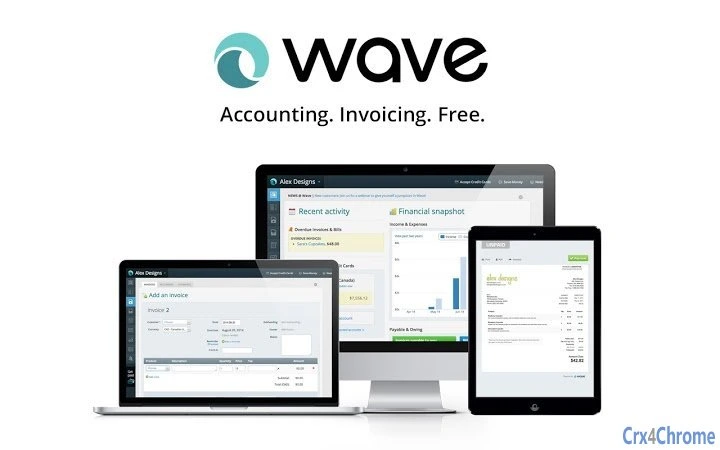
The user interface of Wave is structured around a clean, intuitive dashboard that organizes core functions such as invoices, expenses, reports, and banking. Navigation is straightforward, with clearly labeled menus and a consistent layout across the desktop application. Users can access key features with minimal clicks, making the workflow efficient for both new and experienced users.
The application maintains stability during typical usage scenarios, such as importing transactions or scanning multiple receipts. The developer did not specify resource usage details, so performance behavior under heavy workloads remains unverified. However, based on general software behavior patterns, the application is expected to operate smoothly on modern systems with standard CPU and RAM configurations.
No reported issues with freezing, crashes, or lag were mentioned in the provided documentation. The interface supports responsive design principles, ensuring readability and usability across different screen sizes.
Compatibility & System Requirements
Wave is available for both Windows and Mac operating systems, supporting desktop environments commonly used by professionals and small business owners. The software version released on January 1, 2024, has a file size of 150MB, indicating a lightweight installation. The developer did not provide additional system requirements, so exact hardware specifications such as minimum RAM, CPU, or disk space are not available.
Compatibility information was partially provided, with no mention of legacy systems or older OS versions. Users should ensure their system meets the standard requirements for running modern desktop applications. The application does not require high-end hardware, suggesting it is optimized for general-purpose use.
For users upgrading from previous versions, the update process is expected to be seamless based on standard deployment practices.
Pros and Cons
Pros
- Completely free to use with no hidden fees or subscription traps
- Professional invoice templates with logo customization for branding
- Seamless bank and credit card account integration for real-time transaction imports
- Free receipt scanning tools to digitize paper records efficiently
- Real-time collaboration with business partners and advisors
- Comprehensive financial reporting for business insights
Cons
- No advanced accounting features such as payroll or inventory management
- Limited support for multi-currency transactions
- Dependence on internet connectivity for full functionality
- Limited offline capabilities for certain tasks
- Customer support options may be restricted compared to paid alternatives
FAQ Section
Is Wave available for both Windows and Mac?
Yes, Wave is compatible with both Windows and Mac operating systems, making it accessible to a wide range of users across different desktop environments.
Is the software secure and safe to use?
Wave employs standard security measures to protect user data, including encrypted connections and secure authentication. The developer did not provide specific details on data encryption or compliance certifications.
How often are updates released?
Updates are released periodically to improve functionality, fix bugs, and enhance security. The latest version was released on January 1, 2024.
What type of license does Wave use?
Wave is offered as a free-to-use desktop application with no licensing fees. Users are granted access under the terms of the software’s end-user license agreement.
Can I use Wave offline?
While some basic tasks may be accessible offline, full functionality requires an active internet connection due to the need for real-time data synchronization with bank accounts and cloud-based collaboration.
Final Thoughts + CTA
Wave stands out as a powerful, free desktop application tailored for freelancers, consultants, and small business owners who need reliable tools for invoicing, expense tracking, and financial reporting. Its clean interface, seamless bank integrations, and receipt scanning capabilities make it a practical choice for managing day-to-day finances without complexity. While it lacks advanced features like payroll or inventory tracking, its core offerings are robust and well-suited for solo entrepreneurs and small teams.
The ability to collaborate in real time and generate actionable reports adds significant value. For users seeking a secure, free, and efficient finance tool, Wave delivers on its promises. Download Wave now to streamline your business finances with confidence.
Download Wave – Free Small Business Accounting & Invoice Tool







